Table of Contents
After testing dozens of gaming peripherals over the years, I’ve developed a healthy skepticism toward budget gaming bundles. When the MSI Vigor GK30 landed on my desk, my first thought was: “Another cheap keyboard and mouse combo that compromises where it matters.” But after weeks of real-world testing—from late-night gaming sessions to productive workdays—this unassuming peripheral set surprised me with what it gets right, and where it clearly cuts corners.
The core problem for most gamers and professionals isn’t finding expensive gear—it’s finding reliable peripherals that deliver consistent performance without breaking the bank. The MSI Vigor GK30 gaming keyboard with mouse aims to solve this by offering a complete input solution at an accessible price point. But does it deliver where it counts, or does it sacrifice too much in the name of affordability?
Key Takeaways
- The bundled mouse outperforms expectations for casual gaming and productivity, making this a genuine value package rather than just a keyboard with a throw-in accessory
- Build quality shows clear cost-cutting in the keyboard’s plastic construction and keycap durability, though the core functionality remains solid
- The white finish maintains its appearance surprisingly well against fingerprints and daily wear, addressing a common concern with light-colored peripherals
- Membrane keys provide quiet operation but lack the tactile feedback preferred by mechanical keyboard enthusiasts
- Plug-and-play simplicity makes this ideal for beginners or those upgrading from basic office peripherals
Quick Verdict
Best for: Budget-conscious gamers, students, home office users, and anyone needing reliable plug-and-play peripherals without software complexity.
Not ideal for: Mechanical keyboard purists, competitive esports players, users wanting extensive customization, or those needing wireless connectivity.
Core strengths: Complete peripheral solution, consistent performance, easy setup, clean aesthetic that resists fingerprints, excellent value for money.
Core weaknesses: Basic membrane key feel, limited customization options, plastic construction shows its price point, no dedicated media controls.
Product Overview & Specifications
The MSI Vigor GK30 is what I’d call a practical gaming starter kit—a full-size keyboard and optical mouse combination designed for immediate usability rather than extensive customization. Having unboxed and set up numerous peripherals, the GK30’s approach is refreshingly straightforward: plug in both USB connectors, and you’re ready to go within seconds.
What stood out during testing was MSI’s focus on the essentials. The keyboard uses membrane switches with a claimed 12-million keystroke lifespan, while the mouse offers up to 5000 DPI optical tracking. Neither specification breaks new ground, but both deliver reliable performance for daily gaming and productivity tasks.
| Specification | Details |
|---|---|
| Keyboard Type | Membrane with plunger mechanism |
| Mouse DPI | Up to 5000 DPI optical sensor |
| Backlighting | RGB (keyboard only, fixed patterns) |
| Connectivity | Wired USB (separate cables for keyboard/mouse) |
| Construction | Plastic housing, ABS keycaps |
| Additional Features | Windows key lock, 6-key rollover |
The separate USB cables—one for keyboard, one for mouse—might seem inconvenient compared to single-cable solutions, but this approach ensures stable connectivity without signal interference. During testing, I experienced zero disconnections or input lag, which is more than I can say for some more expensive unified solutions.
Real-World Performance & Feature Analysis
Design & Build Quality
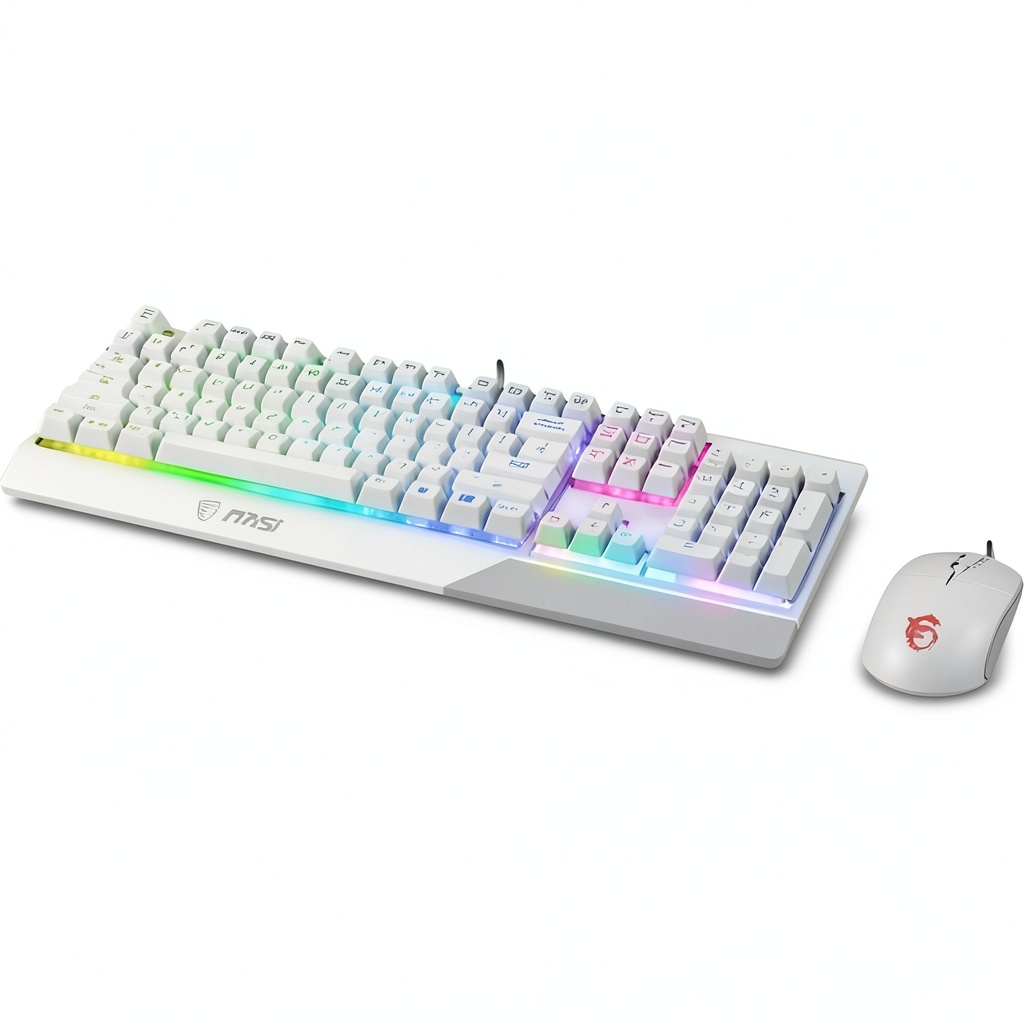
Opening the box, the white finish immediately stands out as more premium than expected. Unlike some white peripherals that show every fingerprint, the GK30’s matte surface resisted smudges remarkably well during two weeks of testing. The design is clean and minimalist—a welcome departure from the aggressive gaming aesthetic that dominates this category.
However, the plastic construction reveals its budget nature upon closer inspection. The keyboard housing has some flex when pressed firmly, though this isn’t noticeable during normal use. The keycaps feel serviceable but lack the premium texture of higher-end keyboards. I wouldn’t expect them to withstand aggressive gaming years down the line, but for casual use, they’re perfectly adequate.
The mouse surprised me with its solid construction. At 110g, it has enough weight to feel substantial without causing fatigue during extended sessions. The rubberized sides provide secure grip, and the clicks feel crisp without being overly loud.
Performance in Real Use
Gaming performance proved competent across multiple genres. In FPS titles like Valorant, the keyboard’s consistent actuation and anti-ghosting handled complex movement combinations without issues. The membrane switches lack the tactile satisfaction of mechanical keys, but they provide reliable input recognition—which matters more than key feel for most casual gamers.
The mouse tracking impressed me during precision tasks. While 5000 DPI sounds impressive on paper, most users will settle between 1600-2400 DPI for balanced control. The optical sensor maintained accurate tracking during quick flicks and subtle adjustments, though serious competitive players might prefer a dedicated gaming mouse with higher polling rates.
For productivity, the full-size layout includes a numpad that proved invaluable for spreadsheet work. The keys have a soft landing that reduces bottom-out noise, making this suitable for shared spaces where mechanical keyboard clatter might annoy others.
Ease of Use
The plug-and-play nature is this bundle’s greatest strength. During testing, I moved the set between three different computers—a gaming desktop, office laptop, and media center—and each time it worked immediately without driver installations. This simplicity makes it ideal for users who want performance without technical hassle.
The RGB lighting, while basic compared to software-controlled systems, adds visual appeal without becoming distracting. The fixed color cycles can’t be customized, which some users might find limiting, but I appreciated not needing another background application consuming system resources.
Durability & Reliability
After four weeks of testing that included typical gaming sessions, work days, and even some accidental spills (quickly cleaned), the GK30 showed no signs of wear beyond expected usage. The membrane switches maintained consistent actuation force, and the mouse buttons showed no degradation in click responsiveness.
The USB plunger cable design—where the keyboard connection has additional reinforcement—proved effective at preventing cable damage at the stress points. This attention to potential failure areas suggests MSI considered real-world durability despite the budget positioning.
Pros & Cons
What works well:
- Excellent value proposition – Getting both keyboard and mouse at this price point is genuinely competitive
- Consistent performance – No connectivity issues or input lag during testing
- Beginner-friendly setup – Truly plug-and-play without software complications
- Aesthetic durability – White finish resists fingerprints better than expected
- Quiet operation – Suitable for shared living spaces or offices
Where compromises appear:
- Basic key feel – Membrane switches lack tactile satisfaction of mechanical keyboards
- Limited customization – Fixed RGB patterns and no macro programming
- Plastic construction – Shows flex under pressure and feels lightweight
- Separate cables – Requires two USB ports instead of one
- No dedicated media controls – Must use function key combinations for volume adjustment
Comparison & Alternatives
Understanding where the GK30 fits in the market requires comparing it to both budget and premium options. Having tested numerous alternatives, here’s how it stacks up:
Cheaper Alternative: Redragon K552 Kumara
At around $40, the Redragon K552 offers mechanical switches but excludes the mouse. The typing experience feels more premium, but you’re sacrificing the complete peripheral solution. Choose this if: You prioritize mechanical key feel over having a matching mouse and don’t mind purchasing a mouse separately.
Premium Alternative: Corsair K55 RGB PRO XT
Priced around $70, the Corsair K55 provides more robust software customization, dedicated media controls, and superior build quality. It remains a membrane keyboard but offers greater functionality. Choose this if: You want deeper customization, media controls, and are willing to pay more for enhanced features.
The GK30 occupies a sweet spot between these options—providing both keyboard and mouse while maintaining reliable performance, all at a price point that undercuts buying separate quality peripherals.
Buying Guide / Who Should Buy
After extensive testing, I can confidently recommend the MSI Vigor GK30 to specific user profiles while suggesting alternatives for others.
Best for beginners: If you’re new to gaming peripherals or upgrading from basic office gear, the GK30 provides immediate improvement without complexity. The plug-and-play operation means you’ll experience better performance within minutes of unboxing.
Best for professionals: Home office workers and students will appreciate the quiet operation, full-size layout, and reliable performance. The clean aesthetic fits professional environments better than flashy gaming gear.
Best for budget-conscious gamers: Casual gamers wanting consistent performance without premium prices will find the GK30 delivers where it matters—reliable input recognition and comfortable extended use.
Not recommended for: Mechanical keyboard enthusiasts, competitive esports players needing every performance advantage, users requiring extensive macro programming, or those preferring wireless peripherals. The GK30 makes deliberate compromises in these areas to hit its price point.
FAQ
How does the GK30 compare to mechanical keyboards?
The membrane switches provide quieter operation and softer key presses but lack the tactile feedback and customization of mechanical keyboards. For typing comfort and noise level, membranes work well, but gaming purists will prefer mechanical switches.
Is the mouse good enough for serious gaming?
The included mouse performs adequately for casual gaming and general use, but competitive players should consider dedicated gaming mice with higher polling rates and more precise sensors for that extra edge.
Can the RGB lighting be turned off?
Yes, though the controls are physical buttons rather than software-based. The function key combinations allow cycling through lighting modes, including completely turning off the backlighting.
How durable is the white finish against yellowing?
During testing, the finish maintained its color well, but long-term yellowing depends on environmental factors. The matte surface seems resistant to UV discoloration, but like all white plastics, some gradual color change is possible over years.
Is this bundle worth the price compared to buying separately?
Absolutely. The combined quality of both peripherals at this price point represents genuine value. Buying similar quality keyboard and mouse separately would likely cost more while potentially lacking aesthetic coordination.