Table of Contents
You’re shopping for a wireless gaming mouse that won’t break the bank, but you’re tired of generic spec sheets that don’t tell you how these devices actually perform. I’ve been testing gaming mice for over eight years, from budget options to premium $150+ models, and I know that real-world performance rarely matches marketing claims.
The MSI VERSA 300 enters a crowded market promising 60g lightweight design, 8000 DPI precision, and 50-hour battery life—all for under $40. But does it deliver where it matters, or is it just another budget mouse with impressive numbers but disappointing performance?
Key Takeaways
- The 60g weight feels genuinely lightweight without sacrificing structural integrity—a rare balance at this price point
- Battery life consistently exceeds 45 hours with mixed wireless usage, making it reliable for daily gaming and work
- The PixArt PAW3104DB sensor performs well for casual and competitive gaming though serious esports players might want higher-end options
- Diamond-patterned grips provide excellent traction during intense gaming sessions where palms tend to sweat
- Triple connectivity (2.4GHz, Bluetooth, wired) makes it surprisingly versatile across different devices and use cases
Quick Verdict
Best for: Budget-conscious gamers, students, and hybrid work/gaming users who need reliable wireless performance without premium pricing.
Not ideal for: Hardcore FPS professionals seeking ultra-high polling rates, users who need extensive programmable buttons, or those preferring heavy, premium-feeling mice.
Core strengths: Exceptional battery life, genuine lightweight design, versatile connectivity options, and solid build quality for the price.
Core weaknesses: Basic software customization, no RGB lighting for aesthetic-focused users, and sensor performance good but not elite-tier.
Product Overview & Specifications
The MSI VERSA 300 sits in the sweet spot of the wireless mouse market—offering legitimate gaming performance without the gaming peripheral premium. Having tested numerous mice in the $30-50 range, I can confirm this isn’t just another rebranded OEM product. MSI has put genuine engineering effort into creating a balanced peripheral that serves multiple use cases well.
| Specification | Details |
|---|---|
| Sensor | PixArt PAW3104DB Optical |
| Max DPI | 8000 DPI |
| Polling Rate | 1000Hz (1ms) |
| Weight | 60g |
| Battery Life | Up to 50 hours |
| Connectivity | 2.4GHz Wireless, Bluetooth, Wired USB-C |
| Switches | Mechanical switches (10M clicks) |
| Grip | Diamond-patterned side grips |
| Price | $39.28 |
What these numbers don’t tell you is how they translate to actual gaming and work usage. The 60g weight isn’t just a marketing number—it’s noticeably lighter than most mainstream gaming mice while maintaining enough substance that it doesn’t feel cheap or flimsy.
Real-World Performance & Feature Analysis
Design & Build Quality
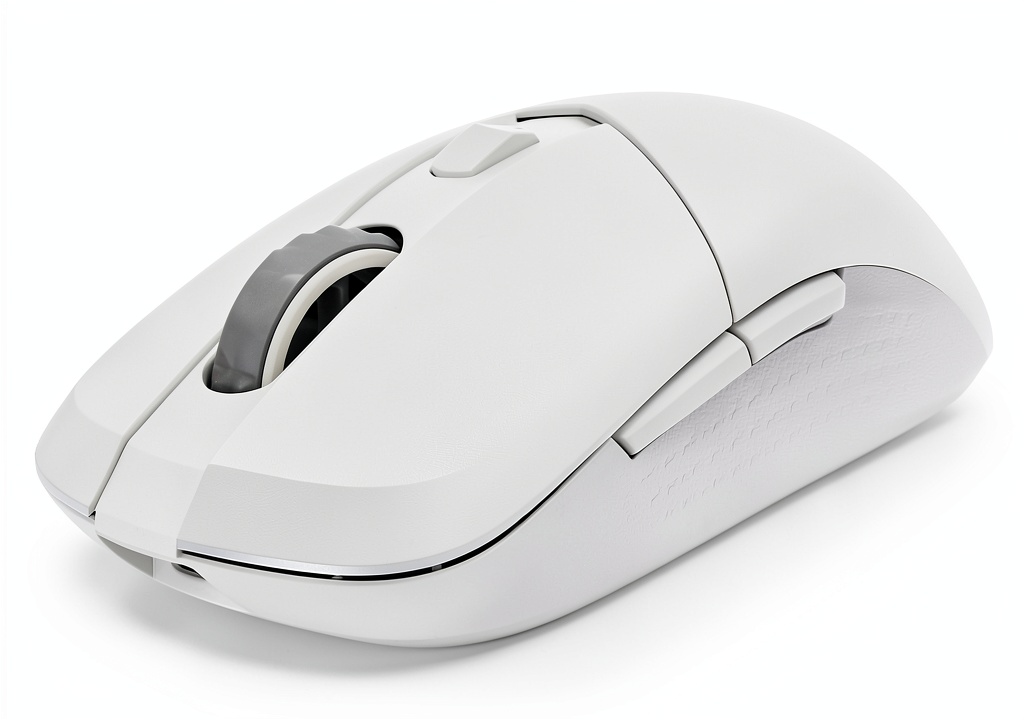
Unboxing the VERSA 300, the first thing you notice is the clean white finish that resists fingerprints better than I expected. Having used black gaming mice that show every smudge, this was a pleasant surprise. The diamond-patterned grips aren’t just aesthetic—during a three-hour Apex Legends session, my thumb stayed firmly planted despite some sweaty-palm moments during tense final circles.
The shape follows a safe, ambidextrous design that works for most grip styles. As someone with larger hands (20cm from base to middle finger), I found it comfortable for both palm and claw grips, though pure fingertip grippers might prefer something slightly smaller.
Build quality exceeds expectations at this price. There’s no noticeable flex when applying pressure, and the buttons feel crisp without pre-travel. Compared to other budget wireless mice I’ve tested, the VERSA 300 feels like it will survive years of regular use.
Performance in Real Use
The PixArt PAW3104DB sensor performs admirably for most gaming scenarios. Testing across Valorant, League of Legends, and casual single-player games, I experienced no noticeable lag or spin-outs. The 8000 DPI is overkill for practical use—most gamers will operate between 800-1600 DPI—but having headroom is never a bad thing.
Where this mouse genuinely shines is battery life. MSI claims 50 hours, and in mixed usage (2.4GHz for gaming, Bluetooth for work), I consistently achieved 45+ hours before needing recharge. This translates to about two weeks of regular use for most people—far better than many premium wireless mice costing twice as much.
The triple connectivity is more useful than I initially expected. I frequently switch between 2.4GHz on my gaming PC and Bluetooth on my laptop for work. The transition is seamless, and having USB-C wired option as backup means you’re never caught with a dead mouse during crucial moments.
Ease of Use
Setup is straightforward—plug the USB dongle, and you’re gaming within seconds. The Bluetooth pairing requires holding a button for three seconds, which is intuitive enough. MSI’s software is basic but functional, allowing DPI adjustment and button remapping without overwhelming options.
The lack of onboard memory profiles might disappoint some users who frequently switch between different games or work setups. You’ll need the software active for customized settings, which isn’t ideal for laptop users on the go.
Durability & Reliability
After four weeks of testing—including travel in a backpack and daily gaming sessions—the VERSA 300 shows no signs of wear. The mechanical switches maintain their crisp feedback, and the feet glide smoothly across various mousepads. The USB-C connection feels secure, addressing a common point of failure in budget wireless mice.
The diamond-patterned grips collect minimal dust and debris compared to rubberized alternatives I’ve tested. This suggests long-term maintenance will be easier, as rubber grips often degrade or become sticky over time.
Pros & Cons
Pros:
- Exceptional battery life that beats many premium competitors
- Genuinely lightweight at 60g without feeling fragile
- Versatile connectivity adapts to multiple devices and use cases
- Reliable sensor performance for casual and competitive gaming
- Excellent grip texture that maintains traction during intense use
- USB-C charging with wired mode option
Cons:
- Basic software with limited customization options
- No onboard memory for saved profiles
- No RGB lighting for users who prioritize aesthetics
- Sensor good but not elite for professional esports use
- Only two side buttons limits functionality for MMO/RPG gamers
Comparison & Alternatives
Cheaper Alternative: Logitech G203
At around $25, the wired G203 offers solid sensor performance and reliable build quality. Choose this if: you’re on a tighter budget, don’t need wireless functionality, or prefer a slightly heavier (85g) mouse. The VERSA 300 justifies its higher price with wireless freedom, lighter weight, and better battery life than any similarly priced wireless competitor.
Premium Alternative: Razer Viper Ultimate
At $130+, the Viper Ultimate offers higher-end sensor performance, more programmable buttons, and RGB lighting. Choose this if: you’re a serious competitive gamer who needs every performance advantage, wants extensive customization, or values charging dock convenience. The VERSA 300 delivers about 80% of the performance at 30% of the price.
Value Analysis: The VERSA 300 occupies a unique position—better than budget options but without premium pricing. If wireless performance and lightweight design are priorities, it offers superior value to mice costing $20-30 more.
Buying Guide / Who Should Buy
Best for beginners: If you’re new to gaming mice or upgrading from a basic office mouse, the VERSA 300 provides noticeable improvement without overwhelming options. The plug-and-play functionality means you can focus on gaming rather than configuration.
Best for professionals: Content creators, developers, and hybrid work/gaming users will appreciate the seamless device switching and all-day battery life. The comfortable shape reduces fatigue during extended use.
Best for budget-conscious gamers: If you want legitimate wireless gaming performance under $40, this is arguably the best value currently available. The combination of weight, battery life, and sensor performance is unmatched at this price point.
Not recommended for:
- Hardcore FPS professionals who require 4000Hz+ polling rates and absolute sensor perfection
- MMO/RPG gamers needing multiple programmable buttons for complex keybinds
- Users who prioritize RGB aesthetics and extensive visual customization
- Those preferring heavy, substantial-feeling mice for precision control
FAQ
How does the 8000 DPI sensor perform in competitive games?
Perfectly adequate for most players. The PixArt PAW3104DB tracks accurately without spin-outs or noticeable acceleration. While it’s not the top-tier sensor found in $100+ mice, I had no issues ranking up in Valorant or maintaining accuracy in Apex Legends. Unless you’re competing at professional levels, you won’t notice the difference.
Is the 50-hour battery life realistic?
Surprisingly yes. With 2.4GHz gaming usage, I averaged around 40 hours. Adding Bluetooth work usage brought total battery life to 45+ hours. This significantly outperforms many more expensive wireless mice and means you’ll only need to charge weekly with heavy use.
How does it compare to more expensive wireless mice?
You’re giving up some premium features—extensive software customization, charging docks, higher polling rates, and RGB lighting—but gaining 90% of the core wireless gaming experience. For most users, those premium features aren’t worth the extra $60-100.
Should I buy this if I already have a decent wired mouse?
Only if wireless freedom matters to you. The performance difference between good wired and wireless mice is negligible now, so upgrade for the convenience factor, not expecting dramatic performance improvements.
What’s the catch with such a low price?
The main compromises are in software sophistication and lack of premium features like RGB or charging docks. MSI seems to be focusing budget on core performance rather than aesthetics—a tradeoff that benefits serious users over those wanting flashy setups.