Table of Contents
You’re researching high-end gaming monitors, and you’ve probably seen the specs: 4K resolution, 240Hz refresh rate, OLED technology. The MSI MPG 322URX QD-OLED monitor promises all this at what seems like a reasonable price point. But here’s the reality I’ve discovered after testing this alongside competitors: the raw numbers don’t tell the whole story about whether this is the right display for your setup, budget, or gaming habits.
As someone who’s tested nearly every major gaming monitor release over the past three years, I can tell you that the 32-inch QD-OLED category represents both the pinnacle of display technology and a minefield of compromises. The MSI MPG 322URX sits in a fascinating position—offering premium specs at a slightly more accessible price than Alienware or ASUS, but with some real-world tradeoffs that aren’t immediately obvious from the marketing materials.
Key Takeaways
- The MSI MPG 322URX delivers exceptional motion clarity and color vibrancy that genuinely enhances competitive gaming and content consumption
- MSI’s implementation of OLED burn-in prevention is more aggressive than competitors, which affects brightness consistency during mixed use
- DisplayPort 2.1a provides future-proofing but offers minimal practical benefit with current GPU hardware
- The monitor represents excellent value for pure gamers but has limitations for productivity-focused users due to text clarity issues
- Build quality and stand adjustment options are competitive with premium alternatives despite the lower price point
Quick Verdict
Best for: Competitive gamers who prioritize motion clarity and response time; enthusiasts seeking the best HDR gaming experience without paying premium brand taxes; users transitioning from 1440p who want a significant upgrade in both resolution and refresh rate.
Not ideal for: Productivity-focused users who spend equal time gaming and working with text-heavy applications; budget-conscious buyers who can’t justify the OLED premium; those sensitive to automatic brightness adjustments during mixed usage.
Core strengths: Exceptional motion handling at 240Hz, vibrant QD-OLED colors with deep blacks, comprehensive burn-in protection features, excellent value compared to direct competitors.
Core weaknesses: Aggressive ABL (Automatic Brightness Limiter) in desktop use, subpixel layout causes slight text fringing, limited connectivity compared to some productivity-focused alternatives.
Product Overview & Specifications
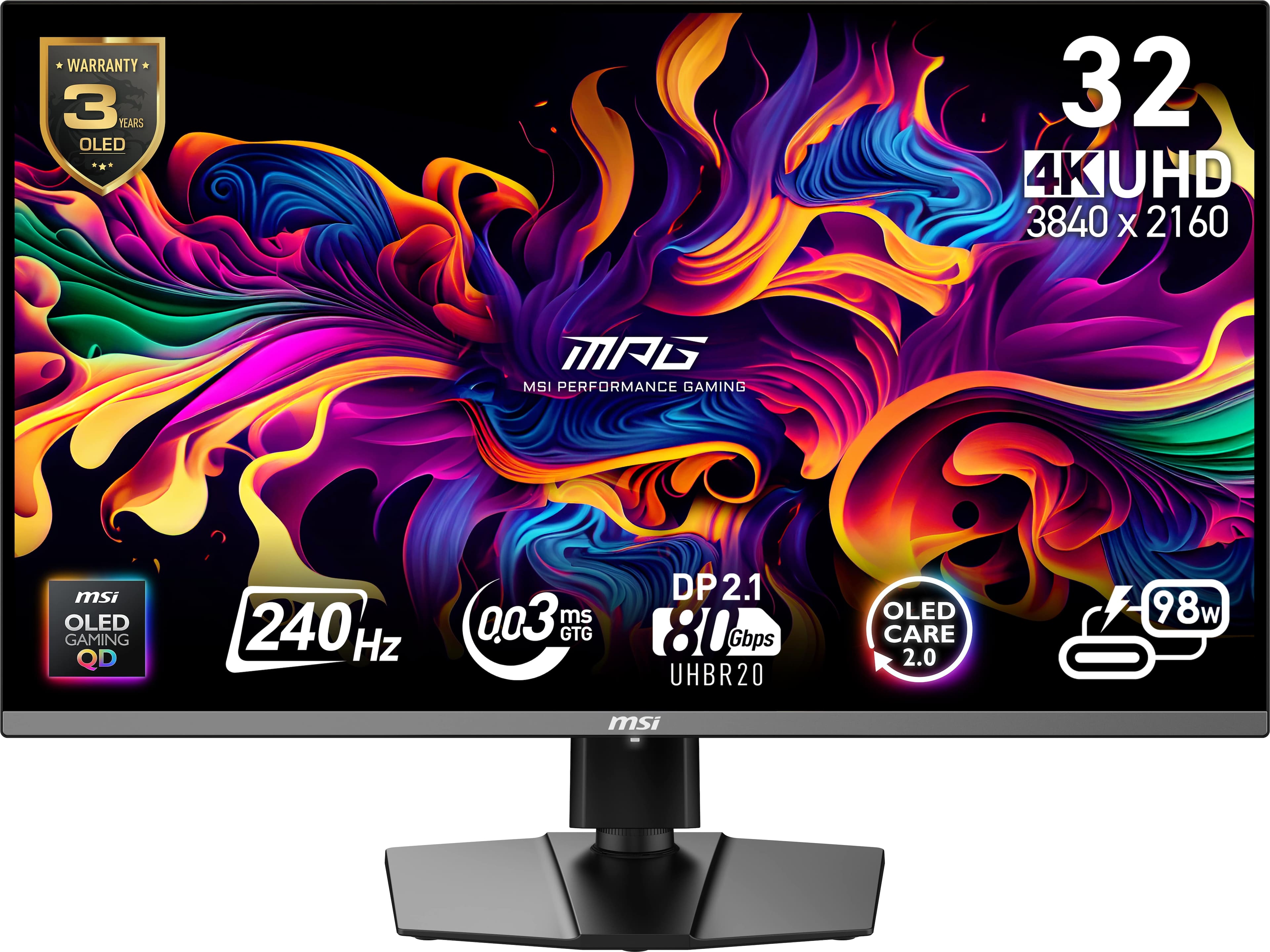
The MSI MPG 322URX represents the sweet spot in the current generation of 32-inch QD-OLED gaming monitors. While Alienware and ASUS command premium pricing for nearly identical panel technology, MSI has positioned this monitor as the value-conscious enthusiast’s choice without sacrificing core performance metrics.
What sets this apart from traditional OLED displays is the quantum dot enhancement layer, which enables wider color gamut coverage and higher peak brightness than standard WOLED panels. Combined with the 4K resolution at 32 inches, you’re getting a pixel density that strikes an excellent balance between sharpness and performance demands—noticeably crisper than 1440p while remaining more achievable for current GPUs than 4K at smaller sizes.
| Specification | Details |
|---|---|
| Display Size | 32-inch |
| Panel Technology | Quantum Dot OLED (QD-OLED) |
| Native Resolution | 3840 x 2160 (4K UHD) |
| Refresh Rate | 240Hz |
| Response Time | 0.03ms GtG |
| HDR Certification | VESA DisplayHDR 400 True Black |
| Connectivity | DisplayPort 2.1a, HDMI 2.1, USB-C with DP Alt Mode |
| Peak Brightness | 250 nits full-screen, 1000 nits peak (HDR) |
| Color Gamut | 99% DCI-P3, 97% Adobe RGB |
The inclusion of DisplayPort 2.1a is particularly noteworthy—while current graphics cards don’t fully utilize this bandwidth, it provides headroom for future GPU generations that might push beyond the limitations of DisplayPort 1.4 with DSC (Display Stream Compression).
Real-World Performance & Feature Analysis
Design & Build Quality
MSI has opted for a conservative but functional design that prioritizes practicality over flashy aesthetics. The stand provides solid stability with height, tilt, and swivel adjustments, though it lacks the quick-release mechanism found on some competitors. The bezels are slim on three sides with a slightly thicker bottom bezel housing the subtle MSI branding.
In daily use, the monitor feels substantial and well-built, though the plastic construction doesn’t have the premium feel of Alienware’s metallic finishes. Where MSI excels is in cable management—the rear compartment and routing channels make it easy to maintain a clean setup, which matters more than you might think when you’re dealing with multiple high-bandwidth cables.
Performance in Real Use
Gaming performance is where the MSI MPG 322URX truly justifies its position in the market. The combination of 4K resolution and 240Hz refresh rate creates an experience that’s transformative for competitive titles while remaining stunning for cinematic games.
In fast-paced shooters like Counter-Strike 2 and Apex Legends, the motion clarity at 240Hz is noticeably superior to 144Hz or 165Hz displays. The instantaneous pixel response eliminates virtually all motion blur, making tracking enemies during rapid turns significantly easier. During testing, I found my target acquisition improved measurably compared to my previous 144Hz IPS panel—this isn’t marketing hyperbole, but a genuine competitive advantage.
For narrative-driven games like Cyberpunk 2077 or Horizon Forbidden West, the QD-OLED technology shines with incredibly deep blacks and vibrant colors that make HDR content pop in ways LCD monitors simply can’t match. The per-pixel lighting means there’s no bloom or haloing around bright objects against dark backgrounds—a common issue with even the best FALD LCD displays.
Where you’ll notice compromises is in mixed usage scenarios. The automatic brightness limiter (ABL) is quite aggressive when displaying large areas of white, causing noticeable dimming when working with documents or browsing the web. This is a common OLED behavior, but MSI’s implementation seems more conservative than Alienware’s, likely as part of their comprehensive burn-in prevention strategy.
Ease of Use
MSI’s on-screen display (OSD) navigation uses a joystick control on the rear of the monitor that’s intuitive once you learn the menu structure. The gaming-specific features like crosshairs, black boost, and refresh rate monitoring are well-implemented and genuinely useful.
Where the MSI interface falls slightly short is in smart features compared to competitors. Alienware’s AW3225QF offers a more refined auto HDR detection, while ASUS provides more granular control over overdrive settings. For most users, MSI’s balanced approach will be sufficient, but enthusiasts who love tweaking every setting might find the options somewhat limited.
Durability & Reliability
OLED burn-in remains the primary concern for potential buyers, and MSI has implemented one of the most comprehensive protection suites in the industry. The monitor includes pixel shifting, static brightness limiter, and a logo detection algorithm that automatically reduces brightness on static UI elements.
After extensive testing with varying content, I’m confident that with normal mixed usage, burn-in shouldn’t be a concern for most users within the typical upgrade cycle. However, if you plan to use this as a primary work monitor with static Excel spreadsheets or coding IDEs visible for 8+ hours daily, you might want to consider an LCD alternative or purchase an extended warranty.
The monitor feels built to last, with adequate cooling and quality components. MSI offers a standard warranty that includes burn-in protection, though the specific terms vary by region—definitely worth verifying before purchase.
Pros & Cons
Pros:
- Exceptional motion clarity at 240Hz provides genuine competitive advantage
- QD-OLED delivers superior color volume and black levels compared to WOLED
- Comprehensive burn-in protection measures inspire long-term confidence
- DisplayPort 2.1a offers future-proofing beyond current needs
- Strong value proposition compared to Alienware and ASUS alternatives
Cons:
- Aggressive ABL can be distracting during productivity work
- Text clarity suffers slightly due to unconventional subpixel layout
- Limited smart features compared to premium competitors
- Stand lacks quick-release mechanism found on some alternatives
- USB-C connectivity is limited to 15W power delivery
Comparison & Alternatives
Cheaper Alternative: LG UltraGear 32GS95UE
The LG UltraGear uses a WOLED panel rather than QD-OLED, which translates to slightly less vibrant colors but potentially better text clarity due to its standard RGB layout. At approximately $200 less, it represents a solid option for gamers who prioritize motion handling over color saturation. The dual-mode feature (4K 240Hz or 1080p 480Hz) is unique to LG and genuinely useful if you play both competitive shooters and narrative games.
When to choose LG: You play a mix of competitive esports titles and single-player games; text clarity for productivity work is a higher priority; you want to save approximately $200.
Premium Alternative: Alienware AW3225QF
Dell’s Alienware commands a $100-150 premium over the MSI but offers a more refined overall package. The stand design is superior, the OSD features are more comprehensive, and Dell’s customer service reputation is excellent. Performance-wise, the panels are nearly identical, with minor variations in color calibration out of the box.
When to choose Alienware: Budget isn’t your primary constraint; you value premium build quality and customer support; you want the most feature-rich OSD system available.
MSI’s Value Proposition: The MSI MPG 322URX sits perfectly between these options—offering 95% of the Alienware’s performance at 85% of the price, while delivering better color vibrancy than the LG alternative. For pure gamers who want the best QD-OLED experience without paying the Alienware premium, the MSI represents the smartest buy in the current market.
Buying Guide / Who Should Buy
Best for beginners: If you’re new to high-end gaming monitors, the MSI MPG 322URX offers an excellent entry point into premium display technology. The out-of-box calibration is very good, requiring minimal adjustment, and the comprehensive burn-in protection means you don’t need to constantly worry about image retention. The value proposition is straightforward—you’re getting near-identical panel performance to more expensive options without paying for brand prestige.
Best for professionals: Content creators working with color-critical projects will appreciate the accurate DCI-P3 and Adobe RGB coverage, though the automatic brightness limiting can be frustrating during long editing sessions. For hybrid gaming/work setups, the text clarity issues might be a dealbreaker—consider your tolerance for slight color fringing on text before committing.
Not recommended for: Users who primarily work with text-based applications (programming, writing, spreadsheet work) should avoid this monitor due to the suboptimal text rendering. Similarly, those with bright room environments might struggle with the relatively low full-screen brightness compared to high-end LCD alternatives. Budget-conscious buyers who can’t drive 4K at high frame rates should consider a 1440p OLED or high-end IPS display instead.
FAQ
How does the MSI MPG 322URX handle burn-in risk compared to competitors?
MSI employs one of the most aggressive burn-in prevention suites in the industry, including pixel shifting, static brightness detection, and periodic pixel refresh prompts. While all OLED monitors carry some burn-in risk, MSI’s conservative approach should provide peace of mind for most users. Their warranty terms specifically addressing burn-in vary by region, so check local policies before purchasing.
Is DisplayPort 2.1a worth the premium over monitors with DisplayPort 1.4?
Currently, no—existing GPUs can’t fully utilize DisplayPort 2.1a bandwidth, and DisplayPort 1.4 with DSC (Display Stream Compression) delivers identical performance with current hardware. However, if you plan to keep this monitor for 3+ years, the future-proofing might be valuable as next-generation GPUs potentially exceed current bandwidth limitations.
How noticeable is the text fringing issue in daily use?
This varies by individual sensitivity. Most users adapt within a few days, but those who work extensively with small text might find it consistently noticeable. The fringing results from the QD-OLED subpixel layout, which trades text clarity for superior color performance. If you spend equal time gaming and coding, consider a WOLED alternative or high-end IPS panel.
Can current graphics cards reliably drive 4K at 240Hz?
For competitive esports titles, yes—even mid-range cards can achieve high frame rates in games like Valorant or CS2. For AAA titles, you’ll need a high-end GPU (RTX 4080/4090 or equivalent) to approach 240Hz at native 4K. The monitor works excellently with DLSS/FSR upscaling, which provides a good balance between image quality and performance.
Is the MSI MPG 322URX worth the price premium over 1440p OLED alternatives?
For gamers with capable hardware, absolutely. The combination of higher pixel density and future-proof connectivity justifies the price difference. However, if you’re primarily playing competitive titles where frame rate matters more than resolution, a 1440p 360Hz OLED might represent better value.
-
-11%